Toolpath optimization control parameters
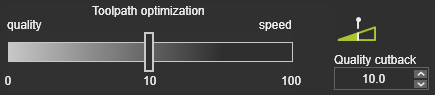
By default not all attributes are displayed. Only the most commonly used attributes are shown. Enable Expert mode using the button in the top-right corner of the dashboard to display all available attributes.

The Optimization control contains the settings used to manage the optimization process. Most settings are common across technologies, while others depend on the manufacturing technology, controller, or machine type. The image above is an example.
Optimization attributes
| Attribute | Description | Remark | Mode |
|---|---|---|---|
| Heuristic parameter to balance between the best optimization result and computation time. | Interpreted as the cost tolerance per meter of toolpath. • 0 = global optimum (lowest cost, longest computation). • 1 = accepts solutions averaging up to 1 cost unit per meter above the optimum for faster computation. | — |
 Push away | Enables an additional optimization criterion that increases the distance between potentially colliding objects. | Acts like a repulsive force while still considering the other optimization criteria. | — |
 Intensity | Controls the strength of the repulsion effect. | The visible effect depends on the weight of the other optimization criteria. | — |
 Safety clearance | Defines the preferred minimum angular clearance from collisions. | If the requested clearance cannot be maintained, closer solutions are still accepted. Default value: 1°. | Expert |
 Max. # variations | Divides the search range into a maximum number of variations (step size). | — | Expert |
 Max. rotary step | Maximum allowed rotary-axis step per optimization variation. | — | Expert |
 Abort if no solution | Stops the optimization process. | Prevents unnecessary computation time by aborting if no solution is found during the first iteration. | Expert |
 Use turn variants | Prevents unwind situations on closed contours by selecting suitable turn values for the first process point. | Limited to one turn value above and one below the default. Ignored when the first process point already has a turn value assigned. | Expert |
 Max. distance | Maximum Cartesian distance between consecutive motion-check points. | — | Expert |
 Max. angle | Maximum angular distance between consecutive motion-check points. | — | Expert |
 Insert process points | Enables automatic insertion of additional process points. | — | — |
 Minimum distance | Minimum Cartesian distance between inserted process points. | Measured between inserted points or between inserted and existing process points. | Expert |
 Minimum distance factor | Minimum distance expressed as a factor of the local process speed. | Measured between inserted points or between inserted and existing process points. | Expert |
Collision-free optimization
During optimization, every toolpath position is evaluated against the collision tolerance defined in the simulation settings.
When the original toolpath already contains collisions, the optimizer normally searches for solutions that stay as close as possible to the collision boundary to minimize optimization costs.
The Push away, Intensity, and Safety clearance settings introduce additional collision-free requirements that encourage the optimizer to maintain a greater distance from potential collisions whenever possible.
Turn variants
Resources with limited rotary axes can experience unwind situations when machining closed contours.
Enabling Use turn variants allows the optimizer to evaluate neighboring turn values for the first process point to reduce the likelihood of unwinding.
Motion check
Automatic optimization evaluates the original toolpath positions and via points on circular paths. It cannot detect collisions occurring between those positions because the trajectory itself is not normally evaluated.
The Motion check option inserts intermediate evaluation points between toolpath positions so that the trajectory can also be checked for:
- Collision
- Reachability
- Singularity
The Max. distance and Max. angle settings determine how densely these intermediate points are generated.
Insert process points
Toolpath quality is measured in optimization costs. Areas containing collisions, reachability problems, or singularities increase these costs.
To reduce these localized problem areas, the optimizer can automatically insert additional process points around critical regions.
The Minimum distance and Minimum distance factor settings control how closely these inserted points may be placed.
⚠️ Warning
Inserted process points belong to the automatic optimization data. Running another optimization, removing optimization data, or regenerating the initial toolpath will delete all automatically inserted process points.