Frame Definitions
Purpose
Frame definitions determine how transformations are applied in the Rototranslation Panel.
Every translation, rotation, or combined rototranslation requires a pivot reference frame that defines:
- the origin of the transformation
- the coordinate system used for offsets
- the pivot location used by the manipulator
Shopfloor Assistant supports several frame instructions used to define coordinate systems and offsets within NC programs.
These frames act as the reference system for all transformations performed during NC editing.
Supported Frame Types
The following frame instructions are supported in the NC Editor.
| Frame | Description |
|---|---|
| G93 | Reference base frame |
| G94 | Additional offset frame |
| G113 / G114 / G96 | Three-point frame definition |
These frame instructions define the active coordinate system used when applying rototranslations.
Reference Frames
G93 — Reference Frame (Base Frame)
G93 defines the primary reference frame of the program.
All movements and offsets are interpreted relative to this frame.
Characteristics
- Defines a reference relative to the machine zero
- All coordinates are interpreted relative to the active G93 frame
- When used in rototranslation, the pivot point remains fixed in space
G94 — Additional Offset Frame
G94 defines an additional offset frame that is applied on top of the active reference frame.
It does not cancel the active G93 frame, but instead adds an incremental transformation.
Characteristics
- Provides incremental offsets relative to G93
- Allows stacking multiple offsets
- Useful for local corrections or fine adjustments
Modal Behavior of G93 and G94
Both G93 and G94 are modal commands.
Once activated, they remain active until:
- another frame instruction overrides them
- the frame instruction is reset
Frame parameters are optional — the frame can remain active without explicitly redefining parameters.
Three-Point Frame Definitions — G113 / G114 / G96
These frame commands allow defining a coordinate frame based on geometry rather than numeric offsets.
The frame is calculated using two groups of three points, defining the orientation and position of the new coordinate system.
Characteristics
- Frame defined using geometric reference points
- Useful for aligning toolpaths to existing geometry
- Often used when importing or adapting programs
Using Frames in the NC Editor
Step 1 — Define the Reference Frame (G93)
Set the desired G93 origin values to define the base coordinate frame.

Press Accept to apply the frame.
The offset is propagated as a rototranslation using the G93 position as pivot.
Step 2 — Apply Additional Offsets (G94)
Define G94 offset values to add a local offset relative to the current reference frame.

Press Accept to apply the offset.
The transformation is calculated relative to the active reference frame.
Step 3 — Stack Multiple Offsets
Multiple G94 offsets can be defined sequentially.
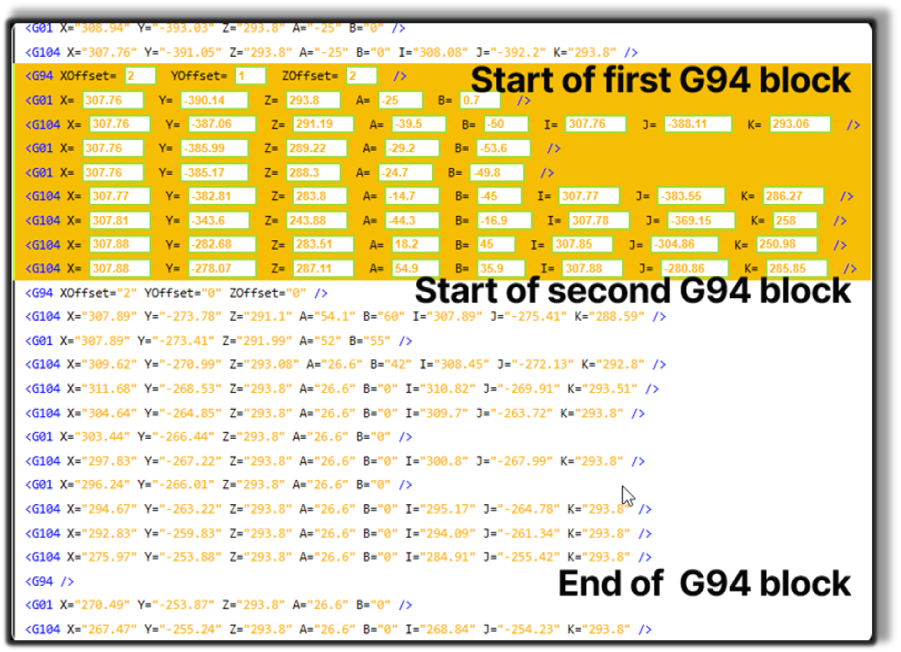
Each new G94 continues from the previous offset frame.
Only the points inside the G94 section receive the additional transformation.
Controller-Specific Feature (Sinumerik One)
Vehicle Frame
The Vehicle Frame (VEHICLE_REF) defines a movable pivot frame inside the NC program.
It can be used as the pivot reference for rototranslation operations.
Characteristics
- defined directly in the NC program
- relative to the previous G93 or G113/G114 frame
- usable as a pivot reference
- does not modify the original point coordinates
Step 1 — Set the VEHICLE_REF values
The frame is defined inside the NC program and applied relative to the previous reference frame.

Step 2 — Press Accept
The Vehicle Frame can now be used as a pivot point in the rototranslation workflow.
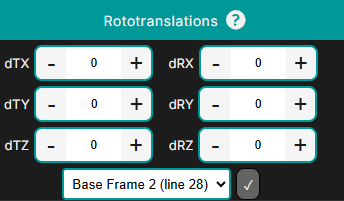
Controller Note
The Vehicle Frame (VEHICLE_REF) is available only for Sinumerik controllers.
Notes for Operators
- The active frame defines the pivot used by the Rototranslation Panel.
- G93 / G96 behave as stable reference frames.
- G94 provides incremental local offsets useful for small corrections.
- Frame commands are modal and remain active until overridden.
- Always verify frame transformations in the 3D Viewer before applying further edits.