Images
All images must be placed in apps/docs/public/media/ and referenced with the /media/ prefix.
Live Example — Dashboard Screenshot

Figure 1: Sample dashboard UI (1200 × 675 px — full-width screenshot format)
<figure>
  <img
    src="/media/_templates/sample-dashboard.svg"
    alt="Sample dashboard showing stat cards, a bar chart, and a data table"
    style={{ width: "100%", borderRadius: "8px", border: "1px solid #e2e8f0" }}
  />
  <figcaption>
    Figure 1: Sample dashboard UI (1200 × 675 px — full-width screenshot format)
  </figcaption>
</figure>
Live Example — Workflow Diagram
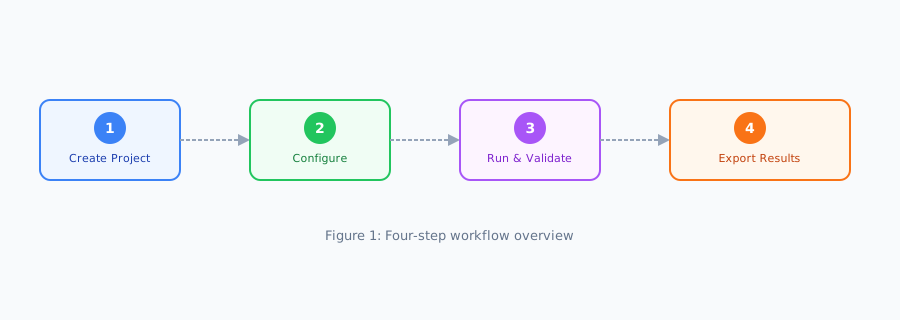
Figure 2: Step-by-step workflow overview (900 × 320 px — inline illustration format)
<figure>
  <img
    src="/media/_templates/sample-workflow.svg"
    alt="Four-step workflow: Create Project → Configure → Run and Validate → Export Results"
    style={{ width: "100%", maxWidth: "700px", display: "block", margin: "0 auto" }}
  />
  <figcaption>
    Figure 2: Step-by-step workflow overview (900 × 320 px — inline illustration format)
  </figcaption>
</figure>
Basic Image Syntax
Image with Caption
Wrap in an HTML <figure> for accessible captions:
<figure>
  <img src="/media/screenshot-overview.png" alt="Overview screen showing the main dashboard" />
  <figcaption>Figure 1: Main dashboard overview</figcaption>
</figure>
Sizing Guidelines
| Use case | Recommended width | Notes |
|---|---|---|
| Full-width screenshot | 1200 px | Use for main UI screenshots |
| Inline illustration | 600–800 px | Use for step-by-step guides |
| Icon / small graphic | 64–128 px | Use for callouts and labels |
All images should be exported as PNG (screenshots) or SVG (diagrams/icons) at 2× resolution for retina displays.
Placement Rule
All production images must exist at
/media/<filename>or a subdirectory of/media/before merging. Thebundle:verifycheck (check 10) will hard-fail the release if any HTMLsrc=attribute points to a missing local file.
Was this page helpful?